Skip to content

yowhatsdownload.app

How to mute or unmute Yo WhatsApp status?

How to mute or unmute Yo WhatsApp status? This is the most reported problem by users. As we know that Yo WhatsApp can allow users send 7 minutes video status, which is not common for a social app. Therefore, it can make users feel free to share their status. And, it has given rise to more status update message on YoWhatsApp.

How to mute or unmuteYo WhatsApp status?

About this, if you are annoyed with anyone's Yo YoWhatsApp status update or if you want to follow the status updating of your friends from time to time. You can choose to mute or unmute their Yo WhatsApp status. Here is a complete guide that you can keep follow to mute or unmute the status on YoWhatsApp.

How to mute Yo WhatsApp status?

  • Step 1 : Open YoWhatsApp on your mobile device.
  • Step 2 : Tap the ”STATUS” option.
  • Step 3 : Click and hold your contact's status update option.
  • Step 4 : Tap ”mute” button.

How to unmute Yo WhatsApp status?

  • Step 1: Open YoWhatsApp on your mobile device.
  • Step 2: Tap the “STATUS” option.
  • Step 3: Opening the status tab and find the “muted updates” section.
  • Step 4: Click and hold your contact's status update option.
  • Step 5: Then, You will see A popup screen, tap “unmute” button.

Whether you want to ignore or follow up the status update, mute or unmute. Yo Yo WhatsApp can meet your requirements. And after finishing reading, I hope this article was very helpful for you about how to mute or unmute Yo WhatsApp status.

You can click the link below to find out the details of YO WhatsApp latest version.

yowhatsapp latest download

Tags

There’s no content to show here yet.

How to Send Original Quality Image in WhatsApp?

In this information age, we can get in touch with anyone around the world as long as we have the internet. WhatsApp is the main instant messaging tool on the market today. It supports the sharing of photos, videos, files, and audio messages.

However, those users with high media file requirements have noticed that WhatsApp compresses images when sharing. It is an excellent method of saving data and improving connectivity, but it may stop you from receiving RAW and uncompressed images in some cases.

This article is for those of you who are also frustrated with WhatsApp not allowing you to share the original quality image.

send original quality image

Send Original Quality Images in WhatsApp

Option 1. Send Images As Documents in WhatsApp

Instead of sending a video file, send the images and videos as a document. It’s a simple and straightforward way. To do that, follow the given steps:

  • Step 1. Fire up WhatsApp and open the desired chat you are tending to send the image or photo.
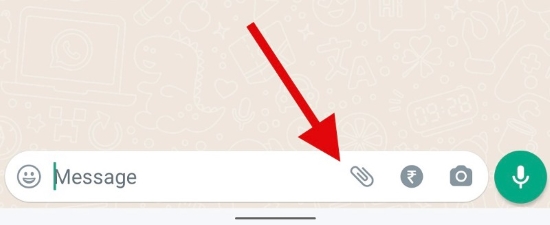
  • Step 2. Inside the chatbox, tap on the paper clip icon called the attachment button.
whatsapp atttachment button
  • Step 3. In the new screen, choose the “Document” option.
  • Step 4. Go through all of the shown documents and pick up the photos and videos you want to send.
  • Step 5. Click on Send option. The recipient can only open the documents after downloading them.

Option 2. Use YoWhatsApp—The Top-Rated Alternative of the Official WhatsApp

We don't know when WhatsApp will update this feature in the future and people don't want to wait any longer. It is wise to find alternatives that are not so limited in functionality.

Yes, it’s like what you’ve heard of YoWhatsApp works well for sending high-quality photos and pictures. YoWhatsApp is a modified version of the original WhatsApp messenger, featuring well-optimized controls. To meet the needs of app users, app modifications have become mandatory with technology changes.

Just like WhatsApp, it makes connections among friends and families from long distances conveniently. Beyond WhatsApp, you can get a vast of advanced features added by its developer that makes it more suit for users' needs. For example, sending uncompressed photos and videos and sharing files of over 1 GB.

So, to send the original quality images, we highly advise you choose Yo WhatsApp latest version. Download YoWhatsApp is quite simple, here is the step-by-step guide to download this app:

  • Step 1. Click on the YoWhatsApp latest version download link, and it will automatically start.
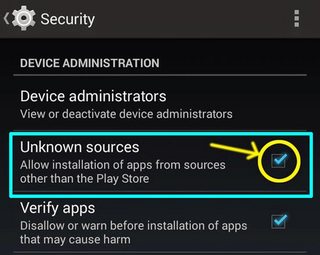
  • Step 2. Go to the Settings menu and enable “Unknown sources” so that your device will accept it as a trusted source.
unknown sources
  • Step 3. Now follow the on-screen instrument, and log in it with your phone number.
  • Step 4. Enter your phone number with no mistake and your phone will receive a verification code.
  • Step 5. Type in the 6-digit code correctly to complete the verification.
  • Step 6. Congrats, you’re available to send original quality images and videos.

Conclusion

WhatsApp users have been complaining about not being able to send high-quality images on the platform. In order to solve this problem, we have shown two ways you can overcome it by sending images as a file on WhatsApp. Of course, it's more straightforward to use YoWhatsApp, which breaks many WhatsApp restrictions and has other smarter features waiting to be discovered, along with the ability to send high-quality images.

If you are interested in YoWhatsApp, click on the button below to download it easily!


Tags

There’s no content to show here yet.

Who Invented YoWhatsApp?

YoWhatsApp is a modified mod, which implements improvements and changes to the traditional WhatsApp. A vast of extra features are added to this app. It is developed from the original WhatsApp source code but is modified to suit the needs of the user.

Similar to WhatsApp, it contains all of its basic features, like messaging and calling as well as adds modifying aspects, including the limitations on the size of files sent, user’s privacy, and the app’s theme.

There are so many amazing features that users can't help but want to get to know the software developer. Yes indeed, knowing its creator and the history of its development may give you a sense of the authenticity and reliability of this software. Without further ado, here is the answer.

who invented yowhatsapp

Who Invented YoWhatsApp?

YoWhatsApp was originally developed and launched by Yousef Al-Basha. Adding more attributes to make YoWhatsApp more convenient to users, and stand out from WhatsApp is the main purpose of YoWhatsApp. However, after some time Yousef Al-Basha stopped updating this app. With Yousef's permission, Fouad Mokdad decided to develop the app in the future. He is planning to release future updates to YoWhatsApp. YoWhatsApp APK has also been released by HeyMods, another developer. 

All newer versions will be updated on our website. This site can be bookmarked so that you can download YoWhatsApp APK at any time. Guys, it's time to take the service to a whole new level with advanced WhatsApp features!

Here we’re going to show you some demanding features YoWhatsApp offers:

Anti-Ban

Using WhatsApp mods may impose account restrictions, but YoWhatsApp's latest version gets around this disadvantage very well. It means you can stay protected and secure when using YoWhatsApp thanks to its anti-ban feature.

Customized Theme, Fonts, and Styles

This application has over 700 themes in a wide variety of font styles. Users can personalize their interface by choosing various styles of layout to their liking. It also automatically installs themes by name, date, and version regularly.

Advanced File Sharing

Users can now send files up to 1 GB in size, which is much better than WhatsApp's original capacity of 16MB. Videos and audio files can easily be sent by users.

Hide Online Status

Users can check the "Last Seen" status to justify the contacts online or offline at the time. Some users find this convenient, but others find it a major privacy concern. So it makes sense to disable your online status to protect your privacy.

Disable your "last seen" status in the official WhatsApp and you will also not be able to see the online status of your contacts. Fortunately, Yo WhatsApp made the upgrade so that only your status is hidden, but in the meantime, you can see everyone else's status.

Summary

As mentioned above, Fouad is the new creator of YoWhatsApp. Yousef has stopped development for some reasons. Well, users do need to worry about that. Fouad has assumed responsibility for the YoWhatsApp. Most importantly, we'll keep sharing the latest update here for you. By the way, YoWhatsApp provides piecemeal increasing of limits, colorful changing features, and strong security functions.

The latest version of YoWhatsApp is available on our official website and is well worth downloading to try out!


Tags

There’s no content to show here yet.
How to Hide Online Status in Yo WhatsApp to Enhance Privacy Protection?

In Yo WhatsApp, online status refers to when the user last used the in-platform, and whether they are currently using the program. In addition, Last Seen does not mean the person has seen your most recent message, but rather when they used WhatsApp last. A blue check mark next to your message is the only way to know if someone has seen it.

hide online yowhatsapp

How to Hide Online Status to Enhance Privacy Protection

To give yourself a bit of privacy, the status can easily be hidden or restricted by changing the setting in the app. So that it won’t be visible to everyone, only to specific contacts. Here's how to hide online status on Yo WhatsApp, along with how to hide last seen in detail.

How to Hide Online Status on Yo WhatsApp?

Now that hiding the last seen time is shown, here is another powerful way to protect your privacy select those people who can view whether you are online or not. Here's what to be done:

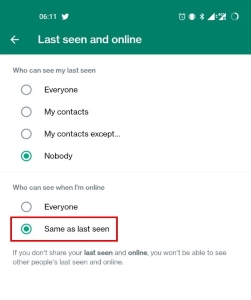
A setting for "Who can see when I'm online" has been added to the same settings page as the "Last Seen" status. Simply enable “Same as last seen”.

same as last seen

Warm Tip: Note that traditional WhatsApp using the Last Seen feature to hide WhatsApp's online status has the limitation that you cannot see other people's online status at the same time. But YoWhatsApp doesn't have this problem, it enables a unidirectional feature restriction. In other words, the feature is unidirectional—others can't see your online status, while you can see others' online status.

How to Hide Last Seen on WhatsApp

The Last Seen status can be turned off easily before hiding your online status.

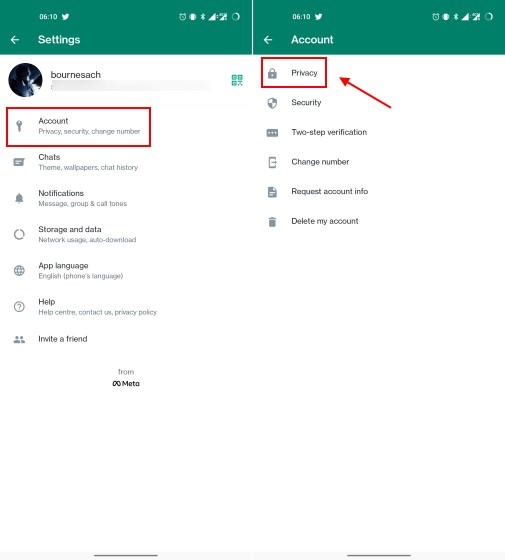
  • Step 1. Start by opening Yo WhatsApp. On the top right corner of the main screen, touch the three-dot. In the drop-down menu bar, choose "Settings".
  • Step 2. Next up, tap on "Account → Privacy". The last seen status can be accessed by tapping here.
privacy settings
  • Step 3. Touch "Last seen" → "Nobody" to stop everyone from seeing your last online status.

Wrapping up

Regular users may have noticed the login status next to the names of their friends. But sometimes this status label disappears again. As written above, you can turn off this status display. This function is useful, for example, messages have often been disputed over whether they are sent, received, seen, or read. Using this function is a good way to protect your privacy. It hides your own status but allows you to view the status of others. Download Yo WhatsApp now and enjoy this high-end feature!

If you are interested in Yo WhatsApp, click on the button below to download it easily!


Tags

There’s no content to show here yet.

How to change group name in Yo WhatsApp

Nowadays, Yo WhatsApp becomes the popular chatting app. We know this app is serve to enhance human connection. You can use it to connect you friends, family also colleague and your leader. In addition, you can make a professional business account which can make people more trust your business.

Yo WhatsApp also can chat by a group, sometimes group chatting can make the business more efficiently. Do you want to know how to change group name in Yo WhatsApp? Come to follow me.


The change guideline is divided into 8 steps.

  • Open your Yo WhatsApp. Make sure you already downloaded the Yo WhatsApp in your smartphone.
  • Select the group which you want to give it a new name. Once you opened the Yo WhatsApp, you will see the chat screen and your chat list included group. Then click on the group to open the group chat screen.
  • Tap on the group info which is under the group name. The group info is on the top of chat page .
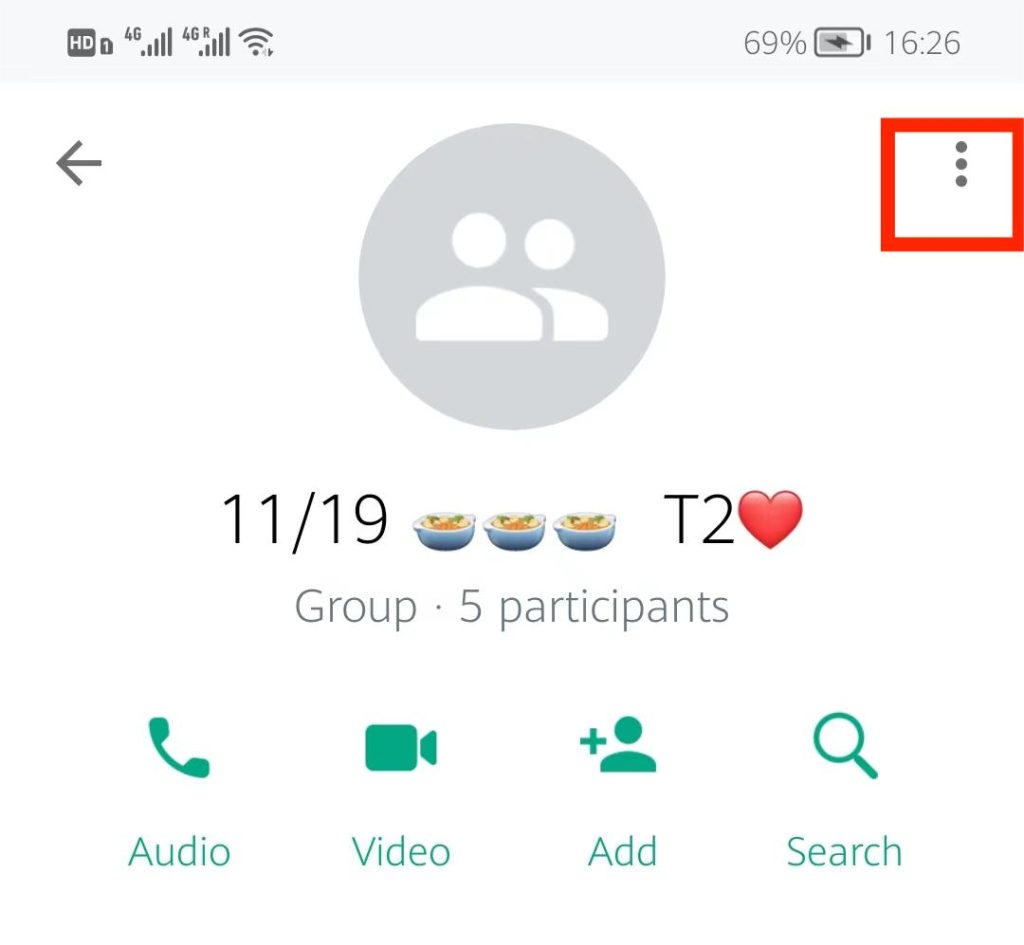
  • Then tap on the 3 dots. It’s on the top right side.
How to change group name in Yo WhatsApp
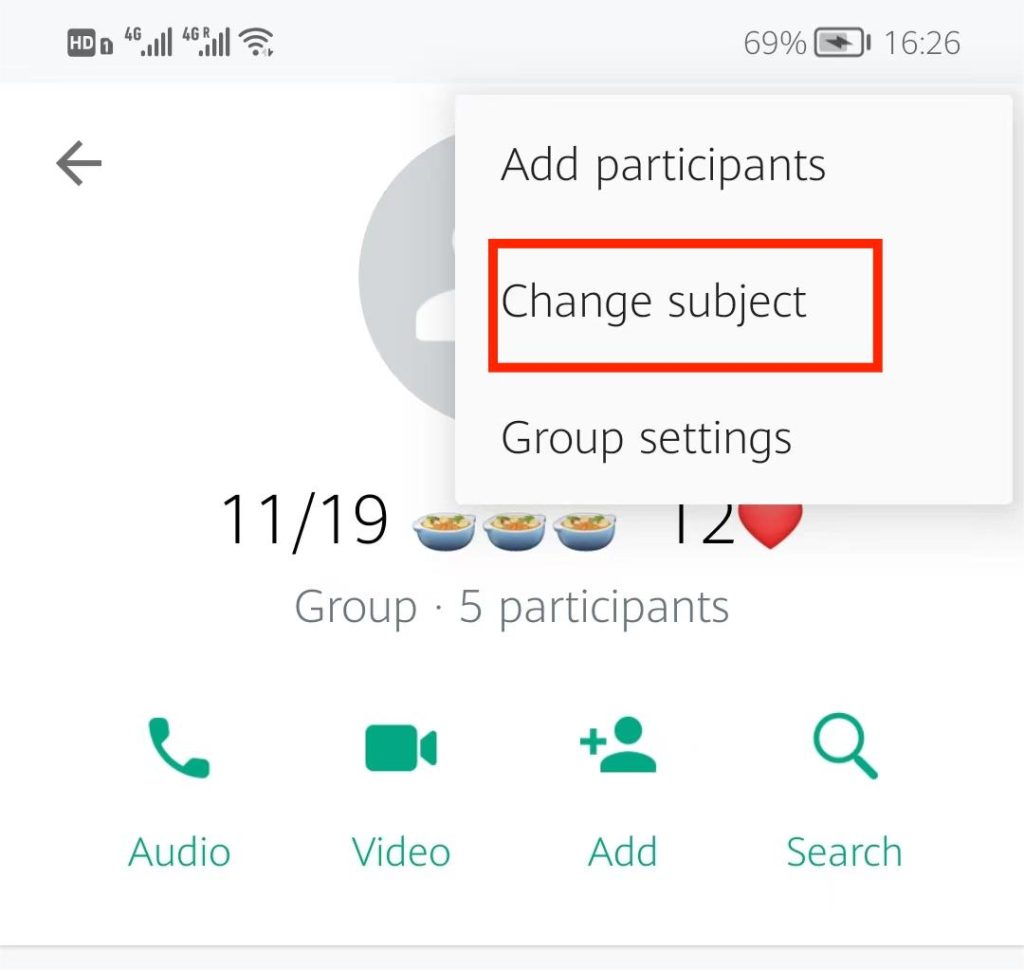
  • Select the change subject. When you open the 3 dots you will see different option then please click on change subject.
How to change group name in Yo WhatsApp
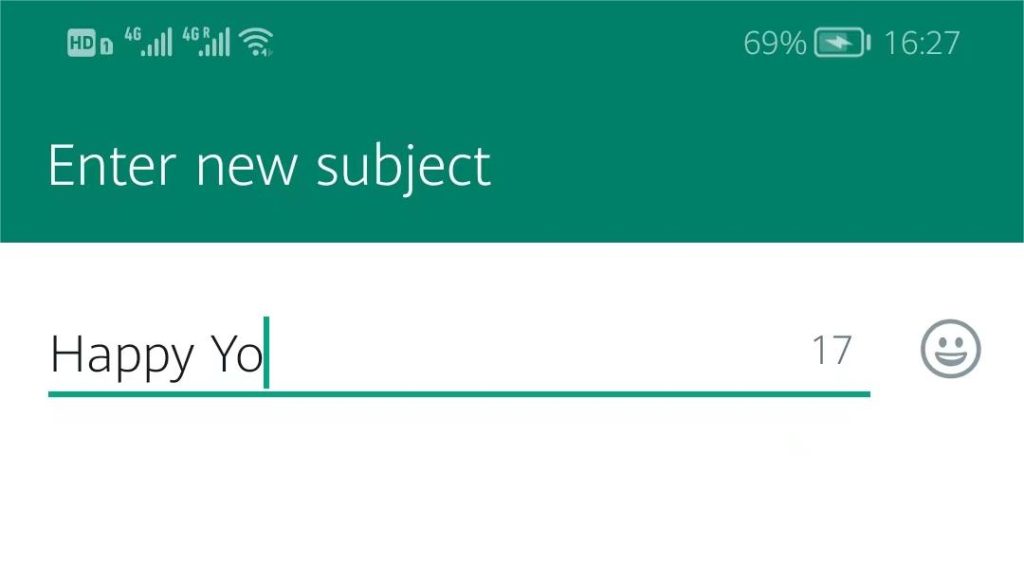
  • Then please enter a new group name. The old name will appear on the screen, please delete it and type the new group name.
How to change group name in Yo WhatsApp
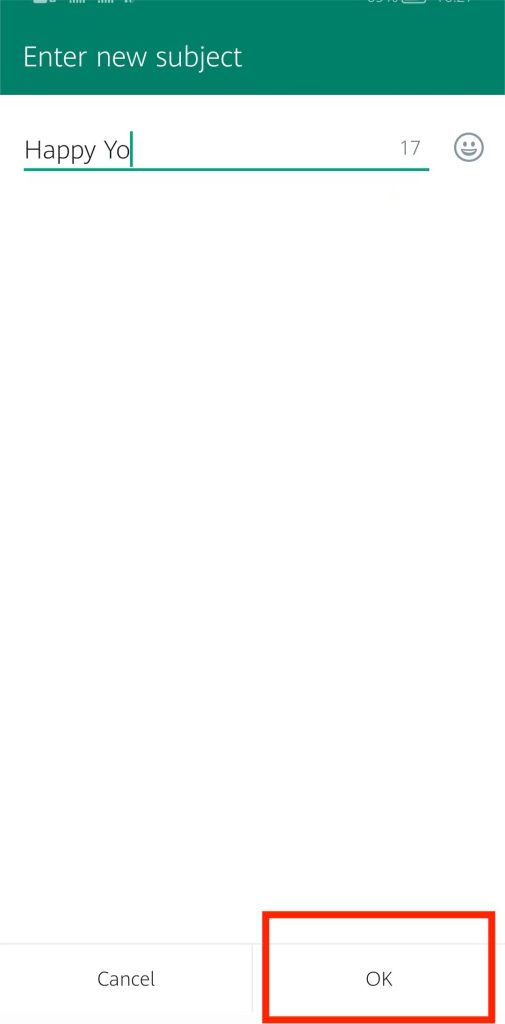
  • Click OK after typing in the new name. As soon as you have finished changing the name of your group. You will see the OK and Cancel selections. Then, click OK.
How to change group name in Yo WhatsApp
  • Now your group name has been changed! After you clicking the OK, change the group name is successful.

Can't wait to change the name in your Yo WhatsApp group? Then let's get started!

You can click the link below to find out the details of YO WhatsApp latest version.

yowhatsapp latest download

Tags

There’s no content to show here yet.
How to add music in Yo WhatsApp status?

Yo WhatsApp In addition to the main function of chatting, most commonly, people love to share different types of images, videos on the Yo WhatsApp status to express their mood or thought, which is the best possible way to make users to say what they want. Adding a music from your favourite song list to the video as your status background music is a great thing to express yourselves more visual.

How to add music in Yo WhatsApp status?

However, we find that there are still some users are trying to figure out how to add music in Yo WhatsApp status. Therefore, here, we’ll share two ways in which how to add your own custom or favorite music in your Yo WhatsApp status.

Add music in Yo WhatsApp status, there are two following methods.

Method 1:

  • Step 1: Play your favourite song in your mobile device.
    • Select a music player app from your device and play the song you want to add to your Yo WhatsApp status. And keep playing in the background and open the Yo WhatsApp app at the same time. You need to notice that you should play the song using speakers and not your headset whether it is wired or wireless. ( Tip: Try to play the audio source with better sound quality)
  • Step 2: Record the music in Yo WhatsApp
    • Come to the Yo WhatsApp application page first. And you make sure the song is playing in the background . Next, click “ My status” option to add status, and start recording your status. ( Tip: Make sure the music playback is at its maximum volume level. It will make the recording music have the better sound quality)
How to add music in Yo WhatsApp status?
  • Step 3: After finish recorded, you can check if everything is in the right order, then click the Green arrow ( at the bottom of the screen) and send. Let everyone in your list can see your new status.

Method 2:

  • Step 1: Go to download and install your favourite Video Editor App.
  • Step 2: Recording your status video without music.
  • Step 3: Add Music to Status in Yo WhatsApp with a Video Editor App.
  • Step 4: Open Yo WhatsApp and click “ My status” to add status update to upload the edited video from the downloaded Video Editor App. Then, click the green “Arrow” icon ( at the bottom of the screen) to share your status with your friends.

Updating and Sharing our Yo WhatsApp status from time to time is also the better way to make a connection between yourself and friends. This way can make friends more understand each other better about what are they thinking or doing now. So, now that you know how to add music in Yo WhatsApp status, why don’t you try to post your first status with music to your friend now?

You can click the link below to find out the details of YO WhatsApp latest version.

yowhatsapp latest download

Tags

There’s no content to show here yet.
How to add music in Yo WhatsApp status?

Yo WhatsApp In addition to the main function of chatting, most commonly, people love to share different types of images, videos on the Yo WhatsApp status to express their mood or thought, which is the best possible way to make users to say what they want. Adding a music from your favourite song list to the video as your status background music is a great thing to express yourselves more visual.

How to add music in Yo WhatsApp status?

However, we find that there are still some users are trying to figure out how to add music in Yo WhatsApp status. Therefore, here, we’ll share two ways in which how to add your own custom or favorite music in your Yo WhatsApp status.

Add music in Yo WhatsApp status, there are two following methods.

Method 1:

  • Step 1: Play your favourite song in your mobile device.
    • Select a music player app from your device and play the song you want to add to your Yo WhatsApp status. And keep playing in the background and open the Yo WhatsApp app at the same time. You need to notice that you should play the song using speakers and not your headset whether it is wired or wireless. ( Tip: Try to play the audio source with better sound quality)
  • Step 2: Record the music in Yo WhatsApp
    • Come to the Yo WhatsApp application page first. And you make sure the song is playing in the background . Next, click “ My status” option to add status, and start recording your status. ( Tip: Make sure the music playback is at its maximum volume level. It will make the recording music have the better sound quality)
How to add music in Yo WhatsApp status?
  • Step 3: After finish recorded, you can check if everything is in the right order, then click the Green arrow ( at the bottom of the screen) and send. Let everyone in your list can see your new status.

Method 2:

  • Step 1: Go to download and install your favourite Video Editor App.
  • Step 2: Recording your status video without music.
  • Step 3: Add Music to Status in Yo WhatsApp with a Video Editor App.
  • Step 4: Open Yo WhatsApp and click “ My status” to add status update to upload the edited video from the downloaded Video Editor App. Then, click the green “Arrow” icon ( at the bottom of the screen) to share your status with your friends.

Updating and Sharing our Yo WhatsApp status from time to time is also the better way to make a connection between yourself and friends. This way can make friends more understand each other better about what are they thinking or doing now. So, now that you know how to add music in Yo WhatsApp status, why don’t you try to post your first status with music to your friend now?

You can click the link below to find out the details of YO WhatsApp latest version.

yowhatsapp latest download

Tags

There’s no content to show here yet.
¿Cómo usar dos WhatsApp en un solo teléfono? Poner en práctica 3 métodos sencillos

WhatsApp es actualmente una de las aplicaciones de comunicación más utilizadas en todo el mundo. Sin embargo, una gran base de usuarios no significa que sea perfecta. A diferencia de Telegram, que permite a los usuarios cambiar rápidamente entre varias cuentas dentro de su app, WhatsApp no ofrece esta función. Oficialmente, sólo puede funcionar una cuenta de WhatsApp en un dispositivo móvil.

Sin embargo, siempre hay más formas que dificultades, y nuestro artículo ofrece algunas soluciones para que puedas entender cómo usar dos cuentas de WhatsApp en tu iPhone.

WhatsApp es actualmente una de las aplicaciones de comunicación más utilizadas en todo el mundo. Sin embargo, una gran base de usuarios no significa que sea perfecta. A diferencia de Telegram, que permite a los usuarios cambiar rápidamente entre varias cuentas dentro de su app, WhatsApp no ofrece esta función. Oficialmente, sólo puede funcionar una cuenta de WhatsApp en un dispositivo móvil.

Sin embargo, siempre hay más formas que dificultades, y nuestro artículo ofrece algunas soluciones para que puedas entender cómo usar dos cuentas de WhatsApp en tu teléfono.

usar dos whatsapp en un telefono

Usar dos WhatsApp en un solo teléfono con 3 métodos

La norma oficial es que sólo se puede conectar una cuenta de WhatsApp a un número de teléfono móvil. Antes de entrar en los detalles de estas soluciones, es importante tener en cuenta que el requisito principal para los siguientes métodos es que usted tiene un teléfono de doble SIM y que necesita dos números de teléfono para utilizar dos cuentas de WhatsApp. Por otro lado, necesitas tener la función WhatsApp Bussiness, WhatsApp Plus o Parallel Space App en tu teléfono. El cumplimiento de estas dos condiciones puede darle derecho a utilizar dos cuentas de WhatsApp en el mismo teléfono. Sigue los pasos, en realidad es bastante sencillo, echa un vistazo.

Método 1. Añadir la aplicación WhatsApp Business para el WhatsApp dual

Muchos usuarios aplican la versión de WhatsApp orientada a los negocios -WhatsApp Business- para contactar con sus clientes. Con eso, es fácil configurar una segunda cuenta de WhatsApp en un solo teléfono.

  • Paso 1. En la App Store, descarga WhatsApp Business y ábrela.
  • Paso 2. Acepta las condiciones del servicio seleccionando "Aceptar y continuar".
  • Paso 3. Toca en Usar un número diferente e introduce el número de teléfono de otra SIM. Toque en Hecho.
  • Paso 4. Seleccione Sí para confirmar el número y verificarlo.
  • Paso 5. Si no hay una copia de seguridad anterior de iCloud, seleccione Omitir restauración.
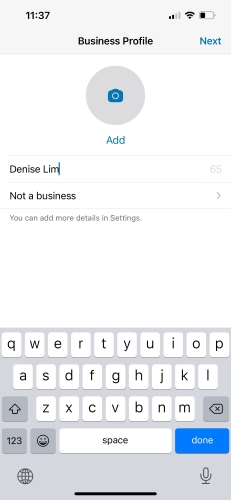
  • Paso 6. Elige la categoría de tu negocio después de introducir tu nombre. Tocar en No es un negocio indicará que tu segunda cuenta es sólo para uso personal. Toca en Siguiente.
  • Paso 7. Para empezar a añadir más detalles sobre su negocio, elija Explorar. Elija No ahora para llevarlo a cabo más tarde.
not a business

Método 2. Cómo usar dos WhatsApp en un solo teléfono usando WhatsApp Plus

Hay aplicaciones mod para WhatsApp, como WhatsApp Plus, diseñada para ser una versión avanzada del WhatsApp tradicional. WhatsApp Plus viene con una gran cantidad de funciones de las que tal vez no hayas oído hablar. Muchos usuarios han informado de que esta versión mejorada de WhatsApp Plus funciona mejor que el WhatsApp original. Más inteligente, más personalizada y con más ajustes de privacidad, es amada por los usuarios de todo el mundo.

  • Paso 1. Haz clic en el enlace "descargar WhatsApp Plus APK".
  • Paso 2. En tu smartphone Android, comprueba si la opción "fuentes desconocidas" está activada, para poder proceder a su instalación.
  • Paso 3. Inicia la aplicación después de la instalación y actualízala con otro número de teléfono.
  • Paso 4. Comprueba el número de teléfono con cuidado y empieza a utilizar dos cuentas de WhatsApp gratuitas ahora mismo.

Método 3. Cómo utilizar dos WhatsApp en un teléfono mediante la función paralela

Si tiene un teléfono inteligente con doble SIM y ofrece la función de aplicación doble o App Twin, sin duda puede tener una cuenta de WhatsApp secundaria.

  • Paso 1. Asegúrate de que la segunda SIM está habilitada y conectada a Internet antes de configurar las aplicaciones duales.
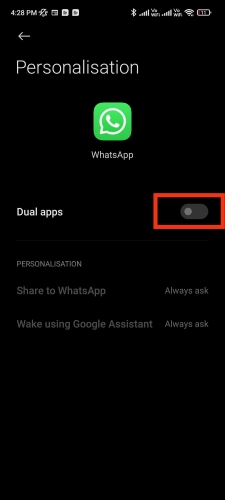
  • Paso 2. Vaya a Settings → Apps → Dual Apps → pulse en Create.
  • Paso 3. Escoge WhatsApp de la lista de apps que soportan las apps duales.
dual apps whatsapp
  • Paso 4. Habilita la aplicación dual moviendo el botón. Espera a que el dispositivo configure la app dual de WhatsApp.
  • Paso 5. Toca el icono de la app dual en la pantalla de inicio para abrir WhatsApp.
  • Paso 6. Escribe el segundo número para configurar WhatsApp.

Nota: Estos pasos son específicos para los dispositivos Xiaomi. La forma de nombrar y ejecutar esta función varía de un smartphone a otro. En OPPO se llama App Clone. En los dispositivos Samsung, la función se llama Dual Messenger. Si tienes un dispositivo Realme, esta opción se llama App Cloner.

Conclusión

De acuerdo con lo anterior, la aplicación no le permitirá crear otra cuenta de WhatsApp con el mismo número de teléfono. El programa anterior muestra tres maneras de decirle cómo utilizar dos WhatsApp en un solo teléfono, pero es importante tener en cuenta que para cualquiera de estos métodos, el primer requisito es que su dispositivo debe tener la funcionalidad de doble SIM y dos números de teléfono móvil. Una versión modificada de WhatsApp como WhatsApp Plus puede proporcionar más funcionalidad que WhatsApp. Los otros dos métodos no tienen nada de especial y utilizan funciones similares a las paralelas, lo que puede provocar un retraso en el teléfono. Elige el método que mejor se adapte a tus necesidades. ¿Quieres saber más consejos sobre el uso de WhatsApp? Visite nuestro sitio web oficial yows.download.

How to use 2 YoWhatsApp in one phone?

People generally have more than two cell phone numbers, one for individual use and one for business. I know that many companies provide their staff with cell phone numbers or SIM cards for their business. In previous times, if you had two numbers, you would have to take two phones. We've all been through this trouble. However, smartphone companies have found a solution to this challenge. Many smartphone companies now offer dual SIM phones, which allow you the ability to carry two numbers on one phone. Companies like Samsung, Huawei, Xiaomi and Oppo all have their own versions of dual SIM phones on the market.

Two Sim card means you could have two WhatsApp accounts. The solution is very easy.

Now the solution is divided into 3 part.

1. YoWhatsApp

Yo WhatsApp is a app that is a WhatsApp mod version. Through the new version of YoWhatsApp you can obtain a lot of extra features which are not available on WhatsApp. The greatest strength of this application is that it offers a greater appeal to WhatsApp.
Yo WhatsApp has a range of optimised features and many users have commented that this updated version of Yo WhatsApp will work better than the original WhatsApp. With more user-friendly features to meet people's needs and more privacy settings, it has been well appreciated by users all over the world.

  • Download Yo WhatsApp from the official download Website.
  • If your Android phone shows” Unknown sources”, just tap on confirm to download the app.
  • After finishing the installation of Yo WhatsApp on your smartphone, open it.
  • Set up your second phone number for the Yo WhatsApp. Then you can start using the second one.
How to use 2 Yo WhatsApp in one phone?

2. Setting on your phone

  • Go to the Setting
  • Tap on App
  • Select Dual Applications
  • Select WhatsApp
  • Tap on the second WhatsApp icon in the main screen
  • Set up your second WhatsApp
  • Start using the second one

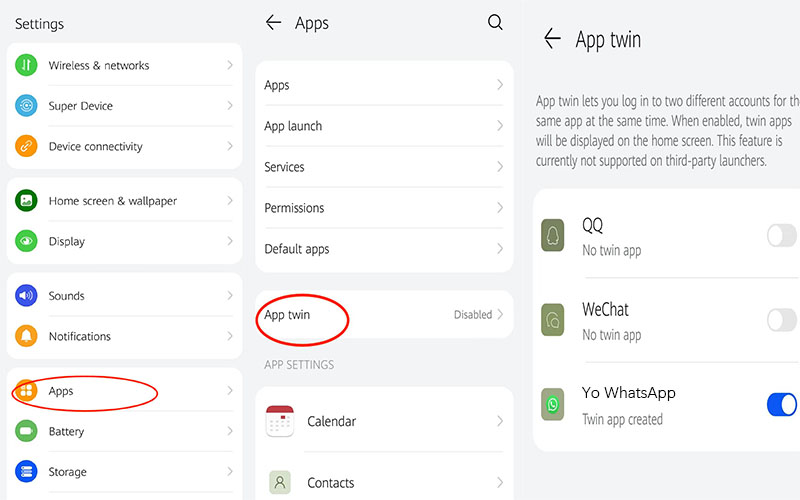
    Notice: The steps are for Xiaomi device, but only have a little different with other brands. Like Dual Applications can be changed to Huawei App twin ,OnePlus Parallel Apps, Vivo App Clone.
How to use 2 Yo WhatsApp in one phone?

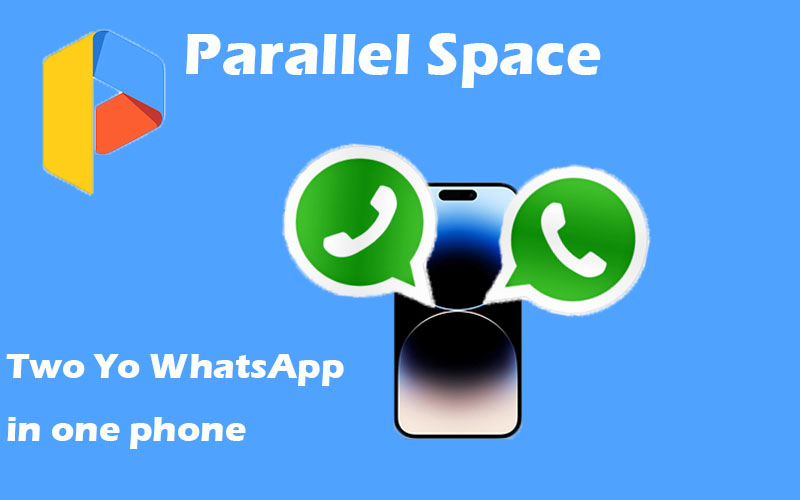
3. Parallel Spaces


The steps above are rather limiting, it only applies to users of Android phones. As we all know, the number of IOS users is also very significant. So we have a different solution for how to use two WhatsApp accounts in one phone. Parallel Spaces app can be solved this problem.

  • Download Parallel space in the Play Store
  • Start the app and it will automatically take you to the clone app
  • Select the Yo WhatsApp
  • Tap the "Add to parallel space" button
  • The parallel space will be opened and the app will be installed in a virtual space on your iPhone.
How to use 2 Yo WhatsApp in one phone?

To better separate life from work, it is essential to set up two Yo WhatsApp accounts on the one phone, which can make your life and work much easier.

You can click the link below to find out the details of YO WhatsApp latest version.

yowhatsapp latest download

Tags

There’s no content to show here yet.

How to share Yo WhatsApp group link?

Yo WhatsApp is one of the popular social tool for chatting with colleague, friend or family. It has so many useful and unique functions. One of the most commonly used functions is the group function. Group function is to allow several users to exchange conversations and share information in the same chat box. This helps improve efficiency and information transfer between work departments, and also helps with emotional contact between the two groups of friends and family respectively.

How to share Yo WhatsApp group link?

But after many users create a group on Yo WhatsApp, they do not know how to invite friends to come in it. Therefore, the steps below will tell you How to share Yo WhatsApp group link to your friends.

There are 6 easy steps to get a Yo WhatsApp group invitation link. Follow the steps below and copy your specific Yo WhatsApp group invitation link.

1.Choose the group of which you want to share the link .
2.Click Option (three dots icon) which from the upper-right corner.
3.Click “Group Information” option .
4.Scroll down the page and click “Invite to Group via link” option.
( You also can Open group conversation page of which you want to share, and then click on the group title,and then you will see the page for step 4. Scroll down and click “Invite to Group via link” button)
5.Then you will see 5 options there. Including:
Send link via Yo WhatsApp / Copy link / Share link / QR code / Reset link
6.Choose the way what you want and send the link to your friends.

Everything you need to know about how to share a Yo WhatsApp group link has been provided in full above. Now it's time to use it and let your colleagues and friends get in touch with you.

You can click the link below to find out the details of YO WhatsApp latest version.

yowhatsapp latest download

Tags

There’s no content to show here yet.

YoWhatsApp Download