Skip to content

yowhatsdownload.app

How to change your screen wallpaper in YoWhatsApp?

Everyone like customize now, even in the YoWhatsApp wallpapers are no exception. You can use the picture of you with your friends to decorate the chat interface, or use your the favourite idol photo to do that and so on. It depends on your like. But how to customize? How to change your screen wallpaper in YoWhatsApp?
How to change your screen wallpaper in YoWhatsApp?

Some people still wonder how to do it. Therefore, in the below paragraph, we will tell you how to change YoWhatsApp home screen wallpaper.

Change All the Chats :

  1. Open the YoWhatsApp on your phone.
  2. Tap the three vertical dots(More option) which on the top of the right corner.
  3. Choose the “Setting”.
  4. You will get into the different screen, then click the “Chats” option.
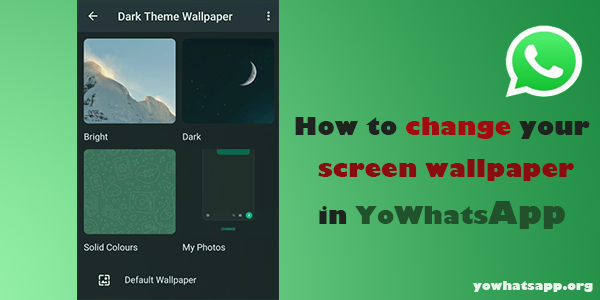
  5. Tap the “Wallpapers”. Get into the screen of change Wallpapers.
  6. Here are the Four category of wallpaper: Bright, Dark, Solid Colors,My photo.
  7. Pick the one what you like.( you can choose “My Photos” to access your photo albums)
  8. Tap “Change” to finish.

Change the specific chat :

  1. Open the chat what you want to change wallpaper.
  2. Tap the three vertical dots(More option) which on the top of the right corner.
  3. A menu will appear, click the “Wallpaper” option.
  4. Get into the wallpaper selection page
  5. Pick the one what you like.
  6. Tap “Change” to finish.

The detail steps about how to change YoWhatsApp home screen wallpaper have been provided upper there, if you still have any questions, please no worry to contact us!

Click the button below to download Yo WhatsApp and discover its interesting features by yourself.


Tags

There’s no content to show here yet.

How to Pin chats and messages in YoWhatsApp?

When using the YoWhatsApp, there is always have some important chats or messages for you and if there important chats and messages can be remained always on top, which will be good for all the users. But how to do that?

How to Pin chats in YoWhatsApp?

YoWhatsApp have a “Pin” function which can achieve that, and the below passage is going to take about how to Pin chats and messages in Yo WhatsApp.

How to Pin chats in YoWhatsApp:

  • Updating the least version of YoWhatsApp and open it.
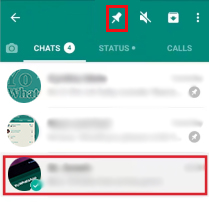
  • Choose the chat what you want to Pin on the top of the list.
  • Tap and hold the chat.
  • You will find a menu bar which show on the top.
  • Last, find the “Pin” option,and click it.
  • The chats have been Pined on the top.

How to Pin messages in YoWhatsApp:

(We use “Star”function to sign the important messages.)

  • Updating the least version of YoWhatsApp and open it.
  • Choose the chat which have the important message that you want to save.
  • Tap and hold the message.
  • You will find a menu bar which show on the top.
  • Click the “star” button.
  • The message have been stared. And you can find the Star messages on the menu options for Yo YoWhatsApp, and tap the “Starred Messages” option.

Now you do not need to worry about that you can not find the important chats or messages again, and it can save you lots of time. Let’s try it now.

Click the button below to download Yo WhatsApp and discover its interesting features by yourself.


Tags

There’s no content to show here yet.
How to Tag Everyone in YoWhatsApp Group?

When you send some important messages in YoWhatsApp group and want someone in this group who can notice it. You need to use “Tag” function. Because it allows you to grab the attention of someone in the group whose attention you want to receive the information and remind them to read it.

How to Tag Everyone in YoWhatsApp Group?

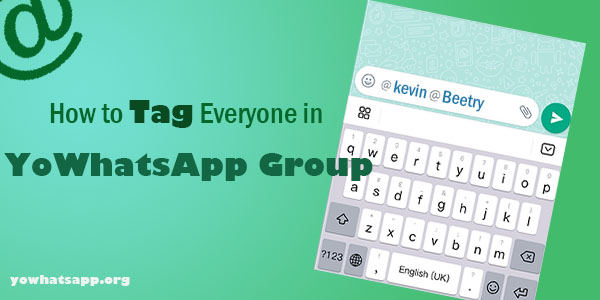
Tag Everyone in YoWhatsApp Group, you just need to use “@” symbol. The detail steps is below.

How to Tag Everyone in YoWhatsApp Group:

  1. Open the Yo YoWhatsApp. And Select the group what you want tap people.
  2. On the Group Message screen, tap in the message window.
  3. tap on the ”@” button on the message window.
  4. Then, you will see a list of Names of all the Contacts in this Group.
  5. Click the name that you want to tap. ( if you want to tap the next person ,then add “@”again, and copy the steps upper.) You can copy this steps to Tag more people.
  6. After choosing all the numbers that you wanted to Tag, then you can type your Message (or you can choose to not type any messages below , just “Tap” people)and tap on the Send button. 

As mentioned above, the people that you have tapped will accept the”Tap” messages, even if they have blocked Group Notifications in Yo WhatsApp.

Click the button below to download Yo WhatsApp and discover its interesting features by yourself.


Tags

There’s no content to show here yet.
How to know who viewed my Yo WhatsApp profile?

Since the launch of Yo WhatsApp, everyone has been very friendly with it. We love having Yo WhatsApp on our mobile phones, so do you know why Yo WhatsApp is so popular? Yo WhatsApp offers free messaging as well as voice calls and caller ID. Users can also share high volume files, HD pictures, long videos, real-time locations and more with family, friends and colleagues.

As with any social network, there are some people you don't want to have communication with on the internet. So do you know how many of your contacts are viewing your Yo WhatsApp profile every day for various reasons? Do you have protection from Yo WhatsApp stalkers? Is there any way to see who has visited my Yo WhatsApp profile?

How to know who viewed my Yo WhatsApp profile?

How to know who viewed my Yo WhatsApp profile?

There is no answer about this question. Yo WhatsApp takes the privacy of its users very seriously, so they will not be upgrading this feature for the time being.

You cannot track who has viewed your Yo WhatsApp profile. Yo Whatsapp does not count and maintain statistics on who has viewed whose profile, and it does not display them.

There are a large number of third-party applications on the market that claim to track who has viewed your personal data. And interestingly enough, some of them are also paid versions. Unfortunately, these apps don't work.

It is not possible to know who has viewed your Yo WhatsApp profile, but we can start by changing your settings in other ways.

According to your settings, it is decided who can see which information from your Yo WhatsApp profile. You can authorise the peopl who you want they view. The steps as Follow:

  1. Tap on Settings.
  2. Select Account - Privacy 
  3. Then modify it according to your requirements.
How to know who viewed my Yo WhatsApp profile?

Click the button below to download Yo WhatsApp and discover its interesting features by yourself.


Tags

There’s no content to show here yet.
There’s no content to show here yet.

How to add someone on Yo WhatsApp group?

Yo WhatsApp as a useful communication application, it brings brings more convenience to people. Yo WhatsApp groups are a nice way to keep in close contact. You can form different kinds of groups, such as one related to work, one about family, or a combination with different groups of friends.

How to add someone on Yo WhatsApp group?

Actually Yo WhatsApp’s operation is easy for everyone. But we can't exclude that some people who are older are still unfamiliar with its operation, so here I'll introduce how to add someone on Yo WhatsApp group.

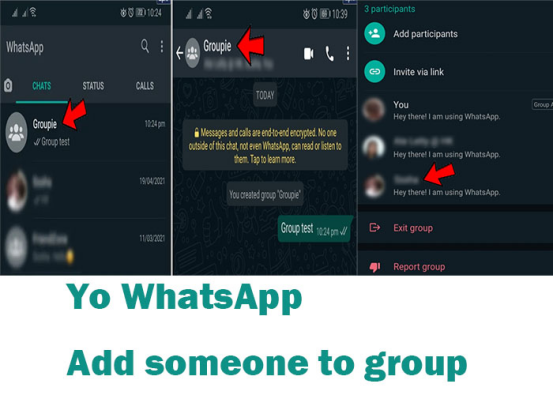
Adding a new participation to Yo WhatsApp group is not a difficult way. The details are as follows:

First, make sure you are the admin of this group.

  1. Open your Yo WhatsApp.
  2. Select the chat group which you want to add members.
  3. Then Tap on the group info which is at the top of the chat page.
  4. Next select the specific members that you would like to add.
  5. Click on the green tick icon to confirm.
  6. Last, tap on the “Add Participant.”
How to add someone on Yo WhatsApp group?

If you have an Android phone, it is the simplest way to add someone to a Yo WhatsApp group chat.

Click the button below to download Yo WhatsApp and discover its interesting features by yourself.


Tags

There’s no content to show here yet.

How to Change YoWhatsApp Ringtone?

Custom Notifications function in YoWhatsApp can allow users to set the Custom ringtones in both individual chats or Group contacts.

How to Change YoWhatsApp Ringtone?

By using this function, you can immediately know if is the important contacts calling you now. With such an understanding, the following paragraph will provide step-by-step procedure about How to Change YoWhatsApp Ringtone.

How to Change YoWhatsApp Ringtone for Individual Contacts:

  • Open YoWhatsApp.
  • Click the “Chats” tab.
  • Choose the contact that you want to set custom ringtone and tab it.
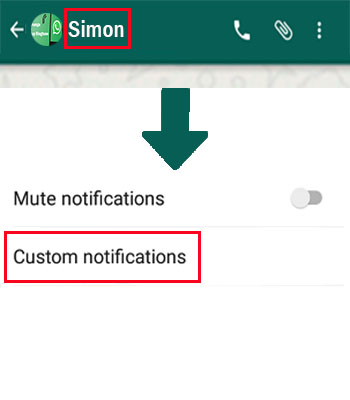
  • In the chat interface, tap on the Contact Name.
  • Then, you will access this Contact’s profile page.
  • Click on the “Custom Notifications” option.
How to Change YoWhatsApp Ringtone?
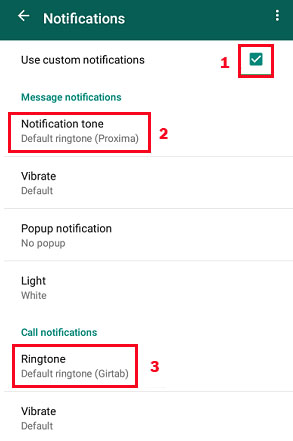
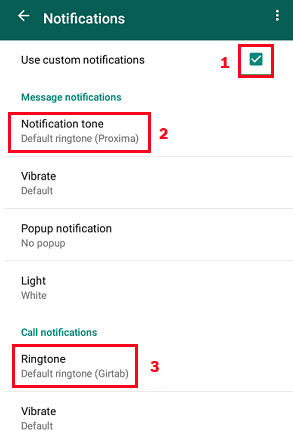
  • Click the “Use Custom Notifications” option and find the “Call Notifications” section to tap on “Ringtone” option.
How to Change YoWhatsApp Ringtone?
  • Last, choose the Ringtone what you like and click ”OK” button.

How to Change YoWhatsApp Ringtone for Group Contacts:

  • Open YoWhatsApp.
  • Click the “Chats” tab.
  • Choose the Group Contact that you want to set custom ringtone and tab it.
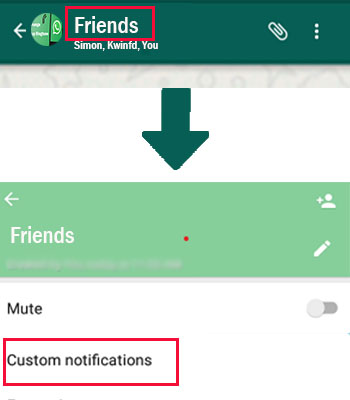
  • Then, tap on the Group Contact Name.
  • You will access this Group Contact’s profile page.
  • Click on the “Custom Notifications” option.
How to Change YoWhatsApp Ringtone?
  • Click the “Use Custom Notifications” option and find the “Call Notifications” section to tap on “Ringtone” option.
How to Change YoWhatsApp Ringtone?
  • Pick the Ringtone what you want to set and click ”OK” button.

Change the Ringtone in Yo YoWhatsApp not only can set your favorite music, but also it can allow you to identify who is calling you by the Custom Ringtone which assigned to the Contact. If you have not changed YoWhatsApp Ringtone, then try it now.

If you are interested in YoWhatsApp, click on the button below to download it easily!


Tags

There’s no content to show here yet.

How to Change YoWhatsApp Ringtone?

Custom Notifications function in YoWhatsApp can allow users to set the Custom ringtones in both individual chats or Group contacts.

How to Change YoWhatsApp Ringtone?

By using this function, you can immediately know if is the important contacts calling you now. With such an understanding, the following paragraph will provide step-by-step procedure about How to Change YoWhatsApp Ringtone.

How to Change YoWhatsApp Ringtone for Individual Contacts:

  • Open YoWhatsApp.
  • Click the “Chats” tab.
  • Choose the contact that you want to set custom ringtone and tab it.
  • In the chat interface, tap on the Contact Name.
  • Then, you will access this Contact’s profile page.
  • Click on the “Custom Notifications” option.
How to Change YoWhatsApp Ringtone?
  • Click the “Use Custom Notifications” option and find the “Call Notifications” section to tap on “Ringtone” option.
How to Change YoWhatsApp Ringtone?
  • Last, choose the Ringtone what you like and click ”OK” button.

How to Change YoWhatsApp Ringtone for Group Contacts:

  • Open YoWhatsApp.
  • Click the “Chats” tab.
  • Choose the Group Contact that you want to set custom ringtone and tab it.
  • Then, tap on the Group Contact Name.
  • You will access this Group Contact’s profile page.
  • Click on the “Custom Notifications” option.
How to Change YoWhatsApp Ringtone?
  • Click the “Use Custom Notifications” option and find the “Call Notifications” section to tap on “Ringtone” option.
How to Change YoWhatsApp Ringtone?
  • Pick the Ringtone what you want to set and click ”OK” button.

Change the Ringtone in Yo YoWhatsApp not only can set your favorite music, but also it can allow you to identify who is calling you by the Custom Ringtone which assigned to the Contact. If you have not changed YoWhatsApp Ringtone, then try it now.

If you are interested in YoWhatsApp, click on the button below to download it easily!


Tags

There’s no content to show here yet.

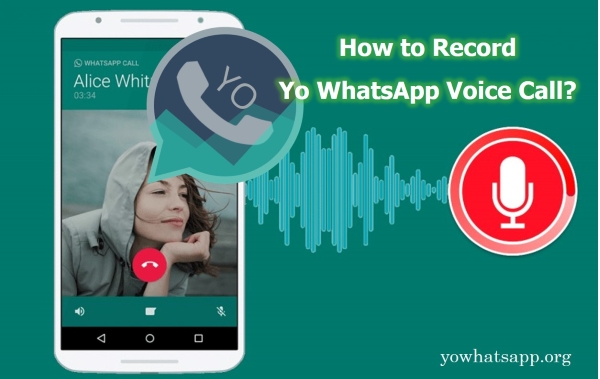
How to Record Yo WhatsApp Voice Call?

Occasionally, you may need to record important phone calls, but you cannot do it immediately since the feature is not available. It has also been reported that some users receive calls on Yo WhatsApp as well, but recording is not possible on that app.

For instance, if you’re working from home, you might need a record of an important meeting. You must therefore rely on third-party apps and other services on your phone to accomplish this. Let's take a look at a few of the most straightforward methods about how to record Yo WhatsApp voice call right now.

record yo whatsapp voice call

Record Yo WhatsApp Voice Call

Way 1. Using Built-in Voice Recording App on Your Phone

Users can activate voice recording features on many smartphone models through their phone settings. Find an option that allows you to record the screen so it can capture any activity the user does while it is on.

  • Step 1. Start your Yo WhatsApp call.
  • Step 2. Generally, you can close out of Yo WhatsApp without ending it as long as your smartphone supports multitasking.
  • Step 3. Open the recording software that comes with your phone to start recording your voice.

Way 2. Using a Third-Party Call Recorder App

Third-party applications that offer call recording are numerous and vary in terms of functionality, cost, and application compatibility. These are fully featured software that not only meets the needs of the user and enables Yo WhatsApp recording, but may also have other unexpected features.

Note: YoWhatsApp is an end-to-end messaging service. Therefore, you must be aware of the risks when you decide to grant access to another application. That's why we still recommend that you use the software that comes with your machine.

Summary

We have a great guide on how to record calls on the messaging app Yo WhatsApp. Usually, your device comes with a voice recording app as standard, if not you can download one yourself, and using the split screen feature of your phone you can achieve recording.

Yo WhatsApp is a premium feature-rich software, if you are interested in it, click the button below to download Yo WhatsApp.


Tags

There’s no content to show here yet.

How to Download Yo WhatsApp Status Video

Yo WhatsApp offers a completely different feature to the original WhatsApp in that Yo WhatsApp allows users to download status videos. If you have used both YoWhatsApp and the original WhatsApp, you will have noticed this unique feature. In the original WhatsApp, users could only watch status videos of their contacts, but in Yo WhatsApp, users have the option to download status videos of their contacts. If you have only just started using Yo WhatsApp, you may be a little confused about the steps on how to download Yo WhatsApp status video.

Steps to download Yo WhatsApp status videos

Well, you don't have to worry at all! The Yo WhatsApp development team has been working hard to make Yo WhatsApp an easy to use and versatile application. So although Yo WhatsApp has more features than the original WhatsApp, the steps for each of the Yo WhatsApp features are very easy to follow. You just have to learn it!

  • Go to the STATUS. Click on the avatar of the contact whose status you want to download and check their status
How to Download Yo WhatsApp Status Video
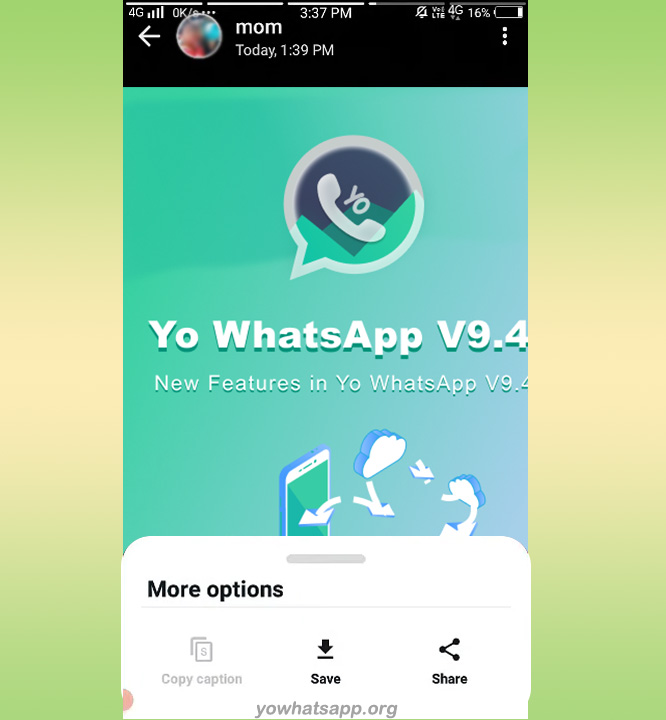
  • In the first step of the picture you can see a download button with a down arrow in the bottom right corner. Click on this button and the screen shown below will be displayed. Click on Save and you will have successfully downloaded your friend's status.
How to Download Yo WhatsApp Status Video

It’s all very easy to do, isn't it my friend? Many users choose to use Yo WhatsApp because not only can they download status video of their contacts, but they can also upload up to five minutes of status. If you want to know more about the features of Yo WhatsApp, you can visit the official website: yows.download

You can click the below link to view more info about YO WhatsApp Download APK latest version.

↓↓↓


Tags

There’s no content to show here yet.

What Is DP in Yo WhatsApp? Here’s the Best Answer

Online jargon and acronyms are somehow the equivalents of petri dishes; if you leave it overnight, it may completely change the next morning. In other words, in this online world, every concept has the potential to update its meaning. For example, most people are still unaware of the technical terms used on social networking sites, such as the meaning of DP in Yo WhatsApp or the full form of DP in Yo WhatsApp V9.45. In Yo WhatsApp, "DP" has been replaced with a more accurate term, so don't worry, today we're breaking down the acronym for you.

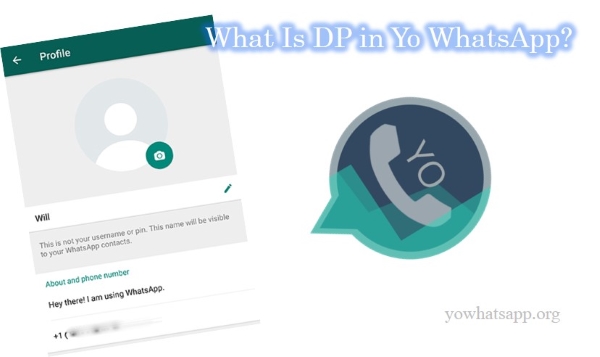
dp in yo whatsapp

Yo WhatsApp DP—Display Picture on Yo WhatsApp

A Yo WhatsApp DP is an acronym for Display Picture, what used to be called a "profile picture." Therefore, DP full form is the image the user shows to others as their display picture. It is a small icon that helps your contacts identify you visually. In Yo WhatsApp, people use various avatars or displays as display pictures, but that doesn't mean it exactly represents them.

Any picture can be used as DP, such as images of popular cricket players, anime, flowers, actors, etc. In contrast to many other aspects of Yo WhatsApp that are determined by your contacts, you can change your profile picture at any time. Likewise, you can control who can see your profile picture by adjusting your privacy settings.

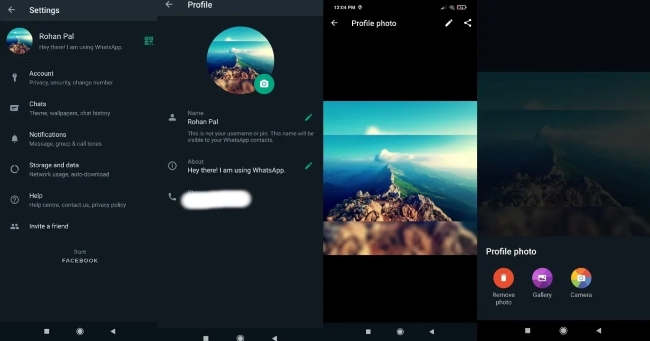
How to Set Display Picture on Yo WhatsApp?

  • Step 1. Turn on YoWhatsApp on your device.
  • Step 2. Tap on the three dots icon at the top right corner.
  • Step 3. Choose settings and you should see your profile, name, and status.
  • Step 4. The photo can be accessed by clicking it. A gray space will appear if you don't yet have one.
  • Step 5. The Edit Profile section is now open to you. Once again, tap the photo and then choose Edit.
  • Step 6. Take a photo or choose one from your Gallery.
  • Step 7. After the image is uploaded, you will need to crop it into a circle. After clicking on Save, the profile picture for your Yo WhatsApp account will be set as your Yo WhatsApp DP.
set display picture

How to Change Your DP on Yo WhatsApp?

  • Step 1. Touch on the Menu button → Settings.
  • Step 2. Navigate to the current DP and tap it, followed by the Camera icon.
  • Step 3. From the gallery or camera roll on your device, you can select a new profile picture.

To Sum up

As you can see from the above, DP (display picture) refers to a personal picture or we also call it a profile picture. It can be set by you and can be changed anytime. When you understand that all three terms basically refer to the same thing, you can be more concise and informed in your chats. Now, you are well-prepared to answer anyone's question about what Yo WhatsApp's DP means.

Click the button below to download Yo WhatsApp and discover its interesting features by yourself.


Tags

There’s no content to show here yet.

YoWhatsApp Download